

Imagine spending months building a beautiful online home, writing articles, and sharing your ideas, only to discover that nobody can find your front door. You look at your traffic charts day after day, but the visitor counter stays completely flat.
This happens to thousands of website owners every single day.
Many times, a website fails to show up on Google not because the articles are bad, but because hidden technical bugs are sending the wrong signals to search engines. In this simple guide, we will learn about the most common mistakes that hurt website rankings and show you exactly how to fix them using clear, everyday English.
Why Technical Errors Confuse Search Engine Robots
Before we look at the mistakes, let’s understand how a search engine works. Google uses tiny computer helper programs called “crawlers” or “robots.” These robots travel across the internet, reading web pages and adding them to a massive digital library.
If your website layout has hidden errors, the search robot gets confused. It might struggle to:
- Read your pages properly.
- Understand what topic you are teaching.
- Trust that your website is safe for users.
When you fix these errors, you clear away the obstacles so search robots and human visitors can enjoy your content.
Read related article: Is Your Website Blacklisted? Here Is How to Check
Signs Your Website Needs a Digital Clean-Up
You do not need to be a computer expert to notice when your website is struggling. Watch out for these simple warning signs:
- Your visitor numbers drop suddenly without a clear reason.
- You publish new articles, but they do not show up in search results for weeks.
- Visitors leave your pages almost immediately because things look broken.
- Pages take more than a few seconds to open on a mobile phone screen.
The Master SEO Error Checklist
To help you organize your digital clean-up, we have grouped the most common website issues by their importance:
| Website Error | Priority Level | What It Affects | Easy Correction |
|---|---|---|---|
| Missing Title Tags | High | Search Understanding | Write a unique name for every page |
| Slow Page Speed | High | User Happiness | Shrink your image sizes |
| Broken Internal Links | High | Robot Navigation | Fix or remove dead links |
| Poor Mobile Layout | High | Smartphone Viewing | Use a responsive mobile design |
| Missing Image Alt Text | Medium | Image Description | Add simple text notes to photos |
| Missing XML Sitemap | Medium | Library Indexing | Submit a page map to Google |
5 Critical Errors and How to Fix Them Simply
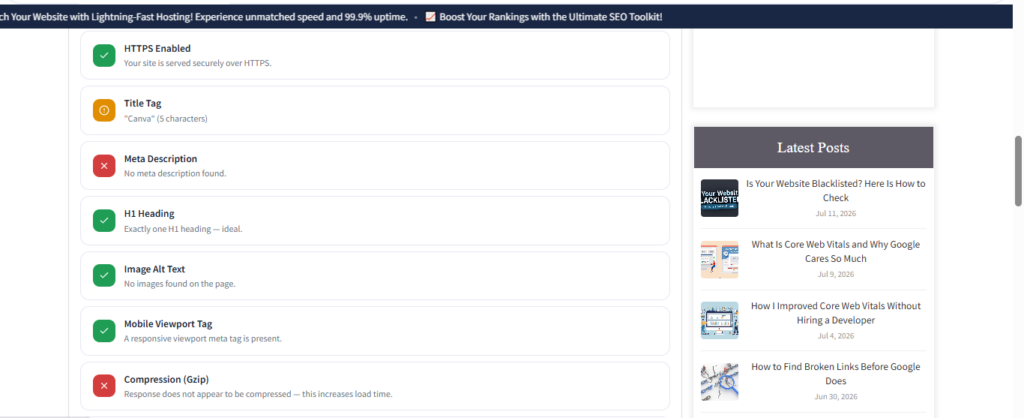
1. Missing or Duplicate Title Tags
A title tag is the main headline that people click on when they see your website listed in search results.
- The Mistake: Using the exact same title for five different pages, or making titles so long that they get cut off on phone screens.
- The Simple Fix: Give every single page its own custom title. Keep it under 60 characters so it looks neat, and place your main topic keyword near the front of the sentence.
- Example: Instead of a boring title like “Our Services,” use a clear title like “Affordable SEO Services for Small Businesses.”
2. Broken Internal Links (Dead Ends)
Internal links are paths that connect one page of your website to another.
- The Mistake: Leaving old links that point to deleted pages. When a visitor or a search robot clicks these paths, they hit a “404 Error” dead end.
- The Simple Fix: Walk through your older articles once a month. If a link is broken, delete it or update it to point to a live, helpful page.
3. Slow Page Speed (The Long Wait)
Speed is incredibly important for human readers. If your website takes a long time to open, people will get bored and leave.
[User Clicks Link] ---> 1 Second (Happy) ---> 3 Seconds (Frustrated) ---> 5 Seconds (Leaves)
- The Mistake: Uploading huge, heavy photograph files directly from a digital camera without shrinking them first.
- The Simple Fix: Use a free image compressor to shrink your file sizes before uploading them. Aim to have your main page elements load in under 2.5 seconds.

4. Poor Mobile Optimization
Most people browse the internet using smartphones rather than large desktop computers.
- The Mistake: Text that is too small to read on a phone, or buttons that sit so close together that a human thumb accidentally clicks both at once.
- The Simple Fix: Always test your pages on your own phone. Make sure your layout automatically scales down to fit small screens smoothly.
5. Missing Image Alt Text (The Blind Spot)
Search engine robots are smart, but they cannot actually “see” a photograph the way a human does. They read a hidden label called “Alt Text” to understand the picture.
- The Mistake: Leaving your image labels named as random computer gibberish like image jpn
- The Simple Fix: Add a short, descriptive note to every picture. For example, change that background label to read: “SEO audit dashboard showing website performance score.”
Frequently Asked Questions
How often should I check my website for these errors?
For most small blogs and portfolio sites, a simple checkup every 1 to 3 months is perfect. If you run a large online shop with hundreds of products, a monthly check is recommended.
Can a single error prevent my site from ranking?
Yes. If you accidentally block search robots inside your computer settings (like a mistake in your robots.txt file), search engines will skip your entire website completely.
Do I need to buy expensive software to fix these problems?
Not at all! Most basic technical errors—like writing clear titles, compressing photos, and fixing broken paths—can be done completely for free inside your standard website platform.
Conclusion: Crafting a Fast, Healthy, and Helpful Website
When a website fails to attract organic traffic, the problem is rarely the quality of your writing. More often than not, a few hidden layout errors are quietly keeping your pages in the dark. By taking the time to write unique page titles, shrinking heavy images to boost your speed, repairing broken dead-end links, and ensuring your text is beautifully readable on mobile phones, you build a clean digital foundation.
When your website runs smoothly and respects the user’s time, both human readers and search engines will naturally reward you with trust and visibility.
Audit Your Site Content Safely on Rankests:
Want to make sure hidden technical bugs aren’t holding back your hard work? Bring your web address over to our analysis platform at Rankests.[https://rankests.com]. Use our free web tools to run a safe, instant checkup on your page layout, test your mobile responsiveness, and find exactly where to optimize your files to build a high-value website today!