

You have spent weeks—or maybe even months—building your website. You have written blog posts, shared your links with friends, and worked incredibly hard. Yet, when you type your main topic into a search box, your website is nowhere to be found.
It feels like your website is completely invisible.
One of the biggest mistakes new website owners make is thinking that just writing text is enough to get visitors. In reality, Google uses hundreds of hidden rules to judge a website. Even excellent writing can get lost if technical bugs or messy layouts confuse the search engine.
The good news is that these problems are like broken toy blocks—they are completely fixable. In this educational guide, you will learn why Google might be hiding your website and how to fix these issues using simple, everyday English.
Read more related article: 25 Common SEO Mistakes That Hurt Rankings
Understanding how Google’s search algorithms assess websites is crucial for ensuring visibility. These algorithms evaluate various factors, including site speed, mobile-friendliness, and proper indexing. Addressing these elements not only enhances user experience but also signals to Google that your site is optimized for its criteria. By implementing the recommended changes, you can significantly improve your site’s chances of ranking higher in search results.
Think of the internet as the biggest library in the universe, and Google as the head librarian. Google uses tiny computer helper programs called “crawlers” or “robots.” These robots travel from page to page, reading your words and organizing them into a library index.
Google’s main goal is to make the library users happy. To do that, the search robot looks for specific signals:
- Originality: Is this text unique, or did a machine copy it from somewhere else?
- Speed: Does the page open instantly, or does it make the user wait?
- Safety: Is the website secured with a padlock lock (
https://)? - Helpfulness: Does the page actually answer the user’s question simply?
If your website layout sends the wrong signals, the librarian will hide your pages and show a competitor’s site instead.
The Ultimate Website Health Checklist
To see if your website is ready for search engine success, look over this simple checkup list. The more “Yes” answers you can give, the stronger your foundation becomes.
| Core Evaluation Question | Importance Level | What It Fixes |
| Is every important page indexed? | Extremely High | Makes your pages visible to the library |
| Do all pages have unique titles? | High | Helps robots understand your topic |
| Does your website load quickly? | High | Keeps human visitors happy and relaxed |
| Is your layout phone-friendly? | High | Adjusts your site beautifully for mobile screens |
| Are your pages linked together? | Medium | Creates a clear path for robots to explore |
| Are your legal pages easy to find? | Medium | Shows Google that you are a trusted business |
6 Common Reasons Your Website is Hidden (And How to Fix Them)
1. Your Pages Are Not Indexed Yet
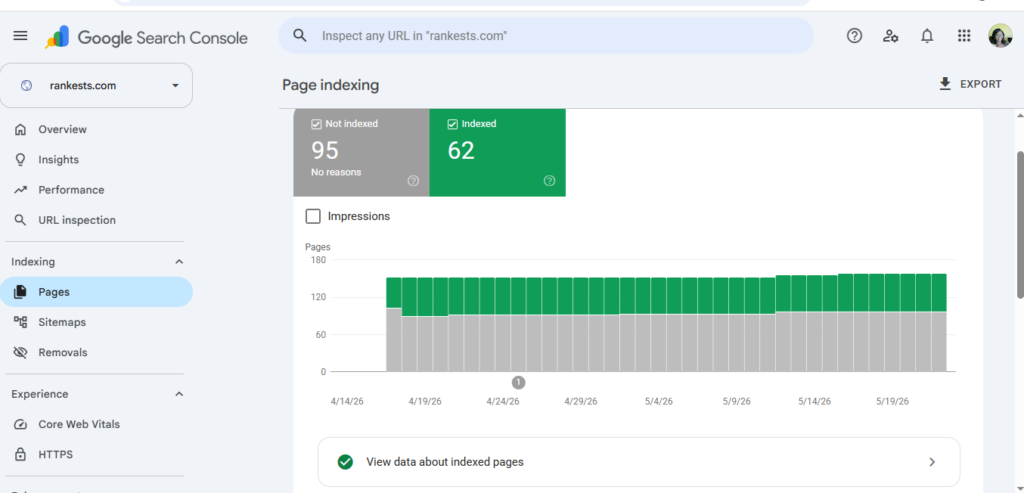
If a page is not “indexed,” it means Google has not written it down in its library book yet. If it is not in the index, it cannot appear in search results at all.
- The Reason: Sometimes pages are too new, or a wrong line of code inside a file called
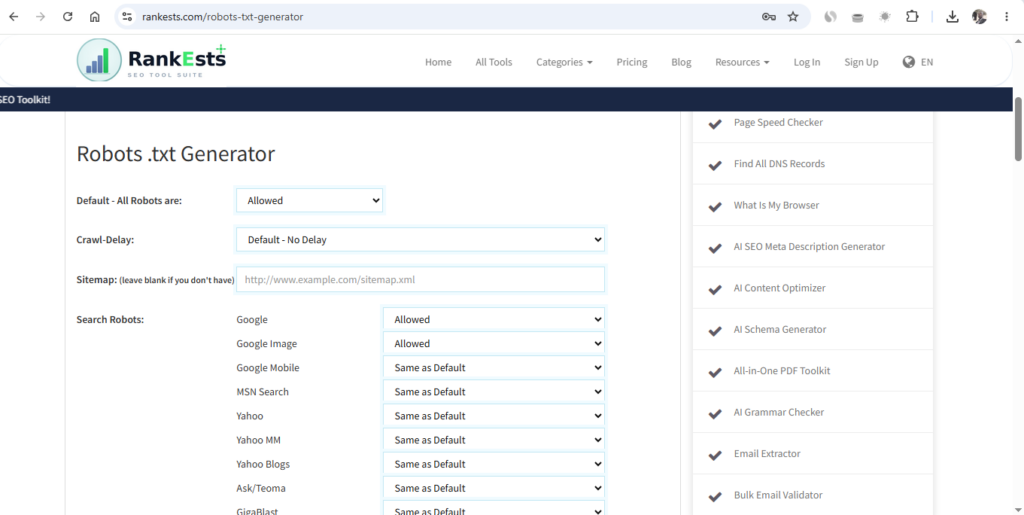
robots.txtis accidentally telling the robots to stay away. - The Simple Fix: Open a free Google Search Console account and submit an XML sitemap. A sitemap is just a simple map of your pages that tells the robots exactly where to look.
2. The Text Does Not Match What People Want (Search Intent)
Imagine walking into a school looking for a math lesson, but the teacher starts shouting a commercial advertisement to sell you pencils. You would walk out immediately. This is a failure of search intent.
- The Reason: Writing generic text that doesn’t solve a real problem. If someone searches for “best free color tools,” they want a list of tools—not a 1,000-word history lesson on how colors were invented.
- The Simple Fix: Before you type, ask yourself: What problem is my reader trying to solve today? Answer that question directly in simple words right at the top of your page.
3. Your Website Loads Too Slowly
Speed is a massive factor in keeping users happy. If your pages take a long time to open, people will get frustrated and close the tab.
[User Clicks Link] ---> 1 Second (Happy) ---> 3 Seconds (Bored) ---> 5 Seconds (Leaves)
- The Reason: Uploading huge, uncompressed image files or running too many heavy design plugins in the background.
- The Simple Fix: Use a free tool to shrink your image file sizes before uploading them. Aim to have your website load in under 2.5 seconds on a mobile network.
4. The Site Looks Broken on Mobile Phones
Google uses “mobile-first indexing.” This means the search engine judges your website based on how it looks on a tiny smartphone screen, not a big computer monitor.
- The Reason: Using fonts that are too small to read on a phone, or placing buttons so close together that a human finger accidentally taps the wrong link.
- The Simple Fix: Choose a “responsive” design template. Always open your own website on your mobile phone to make sure the text flows beautifully and can be read comfortably.
Check out this article; How to Find Broken Links Before Google Does
5. You Are Publishing “Thin Content”
Thin content means publishing a large number of very short, low-quality articles that do not give the reader any real depth or original value.
- The Reason: Trying to trick Google by posting thirty short, 200-word articles written by a generic machine tool.
- The Simple Fix: Focus on quality over quantity. Instead of writing five tiny posts that say nothing new, write one comprehensive, helpful guide that explains a topic so clearly that even a primary school child can learn from it.
6. Missing Clues for Images (Alt Text)
Search engine robots can read text perfectly, but they are completely blind when looking at a photo. They need a text description to know what the picture is about.
- The Reason: Leaving your photo files named as random camera letters like
IMG_9874.#jpg. - The Simple Fix: Add an “Alt Text” label to every picture. Change the name to a natural description like “Web designer using an eyedropper tool to select a color layout.”
Frequently Asked Questions
How long does it take for Google to rank a new website?
There is no magic calendar. For a brand new website, it can take anywhere from a few weeks to several months for search robots to fully trust your domain and start showing your pages to the public.
Does updating old articles improve my SEO performance?
Yes! The internet changes quickly. Refreshing an old article with updated steps, newer examples, and cleaner internal links signals to Google that your platform is active and well-maintained.
Why shouldn’t I target big keywords like “Digital Marketing” right away?
Massive terms are dominated by giant websites that have been around for over a decade. As a new creator, you will win much faster by targeting specific “long-tail” phrases—like “how to fix layout errors on a small business blog.”
Conclusion: Turning Errors into Sustainable Traffic
Building a website that ranks beautifully on search engines is not a matter of luck. More often than not, when a site remains hidden, it is simply because a few small layout bugs or slow loading times are confusing Google’s search robots.
By taking the time to submit a proper sitemap, keeping your pages fast and mobile-friendly, writing original text that naturally satisfies what human users are looking for, and adding clear trust elements, you build a healthy digital foundation. When you focus 100% on making your website a helpful, clean, and safe space for real people, search engines will naturally reward your hard work with long-term visibility.
Scan and Fix Your Web Layout on Rankests:
Want to make sure hidden technical errors aren’t blocking your website from growing? Bring your web address over to our analysis dashboard here on Rankests (https://rankests.com). Drop your URL into our free testing canvas to scan your page loading speeds, check your indexing health, and see exactly how to optimize your digital home to gain the visibility you deserve today!
Read more related articles below: What Is a Good SEO Score? (And How to Reach 80+) and I Checked My Keyword Positions Every Day for 30 Days — Here Is What I Learned




Can you write about tools to rank on yandex if possible.
Thank you I will do that, check back on Saturday.
Thank you, I have recently been looking for information approximately this topic for ages and yours is the best I’ve came upon so far.
However, what in regards to the bottom line? Are you positive in regards to
the supply?
Piece of writing writing is also a excitement, if you be acquainted with afterward you can write or
else it is complicated to write.
Hi! I could have sworn I’ve been to this blog before but after checking through some of the post I realized it’s new to me.
Anyways, I’m definitely happy I found it and I’ll be bookmarking and checking back frequently!
Spot on with this write-up, I seriously feel this website needs a great deal more attention. I’ll probably be
back again to read more, thanks for the info!
What’s up colleagues, nice article and pleasant arguments commented here, I am actually enjoying by these.
There’s definately a lot to find out about this issue. I love all of the points you
made.
Wow, A great perspective. Thanks for putting this together. In case you’re interested, be sure to see [url=https://beard.com/]beard.com[/url] when you can! Looking forward to your next post!
Hi, Such a fantastic piece of content!! Thank you for sharing! In case you’re interested, be sure to check out [url=https://beard.com/]beard care guides[/url] if you get a chance! Looking forward to more!